Engineering
Devlog #3: A Front Panel That Breathes
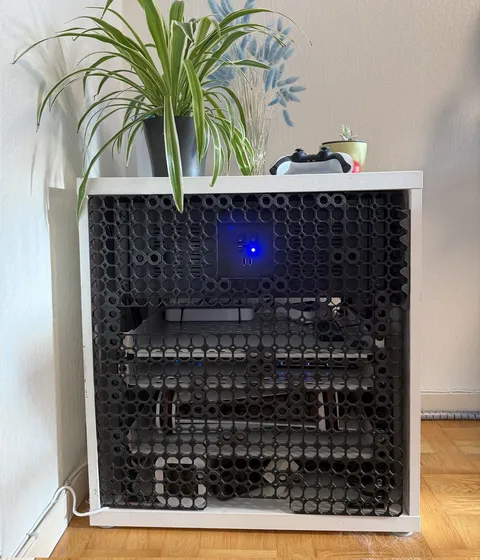
The last thing standing between a box full of gadgets and an actual piece of furniture was the front panel. So I printed one.
Read storyLessons from building and maintaining enterprise-scale systems with Django, PostgreSQL, Celery, and RabbitMQ — the hard problems nobody warns you about.

If you can count rows of a table like this SELECT COUNT(*) FROM TABLE, then you probably haven’t worked with large datasets yet.
This article is about my findings after working on a project for almost two years, which used Django, PostgreSQL, Celery, and RabbitMQ to tackle enterprise-level challenges.
In this article:
COUNT(*) will betray you on large PostgreSQL tables — and what to use insteadEXPLAIN to spot query bottlenecks before they hit productionIf you’re a backend engineer who has outgrown toy datasets and is starting to feel the pain, this is for you.
I recall the first time I got a request for a change on my PR, where I used LargeDjangoTable.objects.count(). I thought the reviewer was messing with me and making things up, as the .count() had never failed me … before.
As it turned out, when using SELECT COUNT(*) in PostgreSQL, the planner may choose a sequential scan to read through every data page of the table until it reaches the end. Similar to counting sheep before you fall asleep :). For tables with millions of rows, the query execution may time out sooner before you get a response from the database. So your beautiful code will “never” reach the end of the line.
NB! It is beneficial to familiarize yourself with EXPLAIN or EXPLAIN ANALYSE <your SQL query> to see the query execution plan, so you can identify potential bottlenecks in your queries. Finding something like Seq Scan on tablename (cost=0.00..9,876,540.00 rows=120,000,000 width=128) is definitely a red flag.
SELECT * FROM my_table WHERE id > :last_seen_id ORDER BY id LIMIT 100;SELECT (CASE WHEN c.reltuples < 0 THEN NULL -- never vacuumed
WHEN c.relpages = 0 THEN float8 '0' -- empty table
ELSE c.reltuples / c.relpages END
* (pg_catalog.pg_relation_size(c.oid)
/ pg_catalog.current_setting('block_size')::int)
)::bigint AS estimate_count
FROM pg_catalog.pg_class c
WHERE c.oid = 'myschema.mytable'::regclass;
NB! The estimate query assumes VACUUM is keeping up. On tables with heavy updates or deletes, dead rows inflate the page count and the estimate can drift — run ANALYZE on the table if you need a fresher number.
Indecies, or indexes in modern English! Bear in mind that:
Apples.objects.filter(color="green", size="medium") on the model Meta, you should (if you want :) ) add the following: indexes = [ models.Index(fields=["color", "size"], name="color_size_idx")] One gotcha: the order of fields in the index matters. ["color", "size"] will be used by Postgres when you filter by color, or color + size — but not when filtering by size alone. Put the field you filter on most often first.Email.Add@example.com will not match email.add@example.com. We have fallen into this trap before, where it didn’t use an index scan, and the simplest solution was CREATE INDEX email_lower_idx ON users (LOWER(email)); SELECT * FROM users WHERE LOWER(email)='email.add@example.com';COUNT(*) on a large table can trigger a full sequential scan — always check with EXPLAIN firstWHERE id > :last_seen_id) is your friendpg_class) is fast and good enough for most use cases
Written by EdgeLimits
The last thing standing between a box full of gadgets and an actual piece of furniture was the front panel. So I printed one.
Read storyThe characteristics of a scalable, modular, multitenant SaaS CRM backend
Read storyBecause with every new project, I have to write the same code all over again
Read story